

Business Central 2026 Wave 1 delivers meaningful improvements across Accounts Payable focused on reducing manual effort while improving confidence at posting time.
This release strengthens payables from end to end:
- How vendor invoices are created and interpreted
- How those invoices are matched to purchase orders and receipts
- How teams post invoices accurately—even in complex scenarios
Rather than treating invoice creation and invoice posting as separate activities, Wave 1 connects them into a more intelligent and more resilient process. AI helps get invoices started correctly, while enhanced matching ensures they can be reviewed, validated, and posted with confidence.
The result is a payables experience that scales—supporting higher volumes, varied purchasing patterns, and warehouse‑managed environments without increasing AP workload.
These improvements start with invoice creation and carry through posting—beginning with enhancements to the Payables Agent.
Enhancements to the Payables Agent
The Payables Agent continues to mature in Business Central 2026 Wave 1, moving AI firmly into day‑to‑day AP operations — not as an experiment, but as a trusted assistant.
Key improvements include:
- AI‑driven one‑to‑one matching between vendor invoice lines and purchase order lines, using intelligent interpretation of line descriptions
- Validation against received quantities, with warnings surfaced when invoiced quantities exceed what has been received
- Richer draft invoice visibility through the enhanced Inbound E‑Documents list, including direct navigation to agent tasks
- Improved mailbox awareness, allowing teams to see which emails have already been processed and avoid duplicate work
- Easier discovery and trial, with the ability to test the agent on a single invoice directly from purchase invoice pages — without full setup
- Clear Copilot credit transparency, helping finance teams understand and plan the cost of using the agent
- Expanded country and language availability, aligning the agent with all Business Central localizations
The result is faster invoice creation, fewer manual corrections, greater clarity for AP teams, and a smoother handoff to approval — while keeping accountants firmly in control of the process.
Important note: The use of the Payables Agent is consumption‑based and may incur additional costs beyond your standard Business Central licensing. Customers should also be aware that many ISV solutions have similar invoice automation capabilities. As a result, the Payables Agent should be evaluated alongside existing solutions rather than adopted by default.
Improved/Smarter Purchase Invoice Matching
Wave 1 also brings important improvements to how invoices are matched to purchase orders and receipt lines, even outside of the Payables Agent scenario. This release offers more flexible invoice matching.
With this release, users can now:
- Match a single invoice line to multiple purchase order lines, even if the orders haven’t been received yet
- Match one invoice line to multiple receipt lines, including partial receipts
- Combine order lines and receipt lines in a single matching view, giving full visibility into what’s being invoiced
- Edit quantities at a granular level, allowing partial invoicing without extra reconciliation steps

The matching interface presents invoice lines, related order lines, and receipt lines in a clear, structured hierarchy—making it easier to understand what’s being billed and why
Automatically Receive When You Invoice
For simpler purchasing scenarios, Business Central now supports automatic receiving during invoice posting.
Users can mark purchase orders as “receive on invoice.”
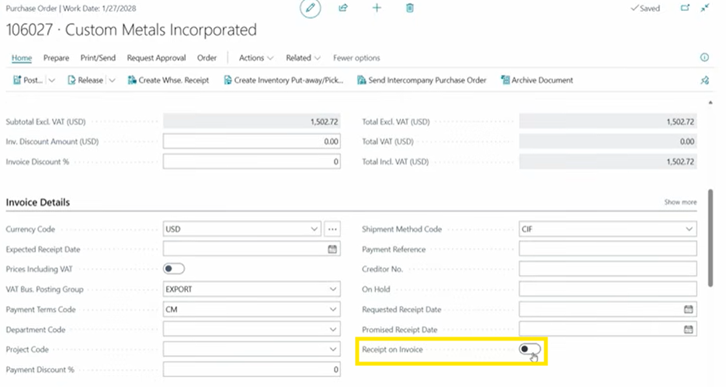
When the vendor invoice is posted:
- Receipts are automatically created and posted
- Quantities received and invoiced stay perfectly in sync
- Manual receiving steps are eliminated
This is especially useful for low‑risk purchases or service‑like items where detailed receiving isn’t required, helping teams save time while maintaining accurate inventory and financial records.
Built for Complexity: Item Tracking and Warehouse Scenarios
The new matching capability also supports more advanced setups, including:
- Serialized and tracked items
- Directed put‑away and pick locations
- Warehouse-managed receipts
Users can match invoice lines before entering quantities, ensuring that item tracking and warehouse rules are respected. The system also provides visibility into which serial or lot numbers are being invoiced and which receipts they belong to, improving auditability and confidence during posting.
Why These Two Improvements Matter Together
Individually, these features save time. Combined, they address the full AP lifecycle:
- AI helps create and prepare invoices faster
- Improved matching ensures they post correctly
This pairing reduces friction without sacrificing control, making automation realistic for finance teams that care about accuracy, auditability, and throughput.
The Bottom Line
Business Central 2026 Wave 1 isn’t just adding AI — it’s reinforcing the fundamentals of payables processing and making them work better together.
For AP teams, that means:
- Less manual matching
- Fewer posting errors
- Faster invoice cycles
And for partners and customers alike, it’s a strong step toward truly modern AP in Business Central.